Referrals & affiliate program
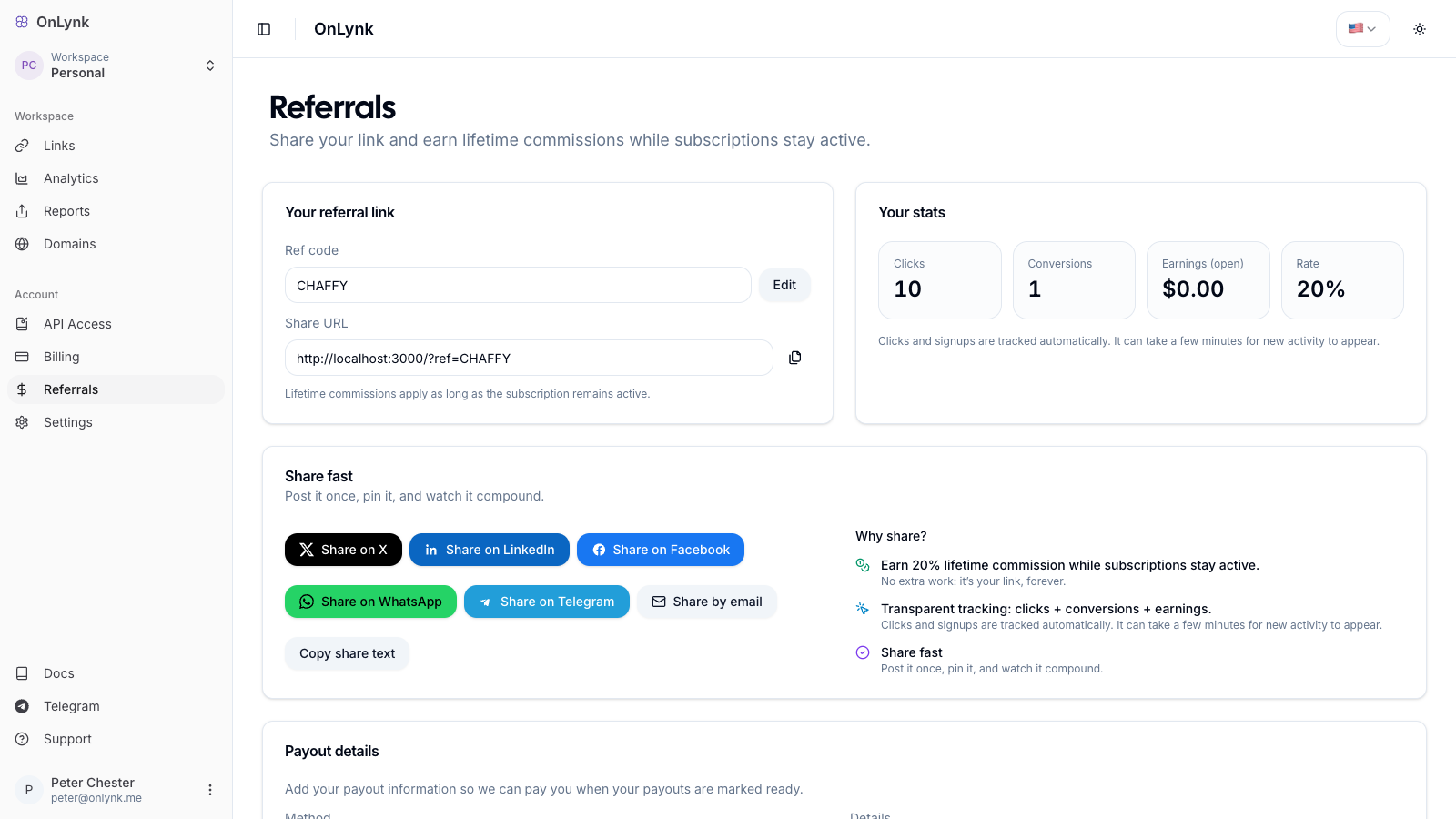
What it is: The referral program lets any OnLynk user earn a recurring commission on the subscriptions of customers they bring in. You get a personal referral link, and OnLynk tracks clicks, sign-ups, and earnings for you.
How it works
Section titled “How it works”- Create your referral code in the dashboard. You pick a code (e.g.
MYCODE) or let OnLynk generate one for you. - Share your link —
https://onlynk.me/?ref=YOURCODE— on social, by email, or anywhere your audience is. - A visitor clicks your link. The referral is captured in their browser for 90 days.
- They subscribe to a paid plan. OnLynk attributes that customer to you (first-touch: one customer is credited to one affiliate, for life).
- You earn a commission on every successful subscription payment they make — not just the first one.
Lifetime & recurring: attribution is first-touch and permanent, and a commission line is created on each paid invoice, so you keep earning as long as your referred customer keeps paying.
Commission rate
Section titled “Commission rate”| Detail | Value |
|---|---|
| Default rate | 15% of each subscription payment |
| Duration | Lifetime of the referred customer’s subscription |
| Recurring | Yes — one commission per successful payment (Stripe or Radom) |
The rate shown in your dashboard is the rate that applies to your account.
Getting started
Section titled “Getting started”Open Referrals in the dashboard:
- Go to Dashboard → Referrals.
- Either type a custom code or use Generate for me.
- Codes are uppercased automatically. Follow the format hint shown under the field.
- Click Claim to create your affiliate profile.
- Copy your share URL and start sharing.
You can edit your referral code later from the same page (subject to availability — codes are unique).
Quick share
Section titled “Quick share”The Referrals page includes one-click share buttons for X, LinkedIn, Facebook, WhatsApp, Telegram, and email, plus a copy share text button with a ready-made message.
Tracking your performance
Section titled “Tracking your performance”Once your profile exists, the dashboard shows:
| Metric | Meaning |
|---|---|
| Clicks | Visits recorded on your referral link |
| Conversions | Referred users who became customers |
| Earnings (open) | Commissions accrued but not yet paid out |
| Rate | Your current commission rate |
A 30-day chart breaks down clicks, conversions, and earnings over time.
About click tracking: clicks are best-effort and may be affected by ad blockers or privacy settings. Conversions and earnings are the source of truth for what you are owed.
Getting paid
Section titled “Getting paid”Payouts are processed manually by OnLynk. To get paid:
- In Referrals → Payout details, choose a payout method: PayPal or Bank transfer.
- Enter the matching details (PayPal email, or bank account information).
- Save.
Commissions are grouped into monthly periods and settled according to the program’s payout schedule. Earnings shown as open are pending; once included in a payout they are marked as paid.
Frequently asked
Section titled “Frequently asked”Do I need a paid plan to refer people? No — any user can create a referral code and earn commissions.
What if someone clicks several referral links? Attribution is first-touch: the customer is credited to the first affiliate captured, and stays attributed to them.
How long does the referral cookie last? 90 days from the click. If the visitor subscribes within that window, the sale is attributed to you.
Related
Section titled “Related”- Glossary — Definitions of referral code, attribution, and commission.
- Onboarding — Plans and billing context.