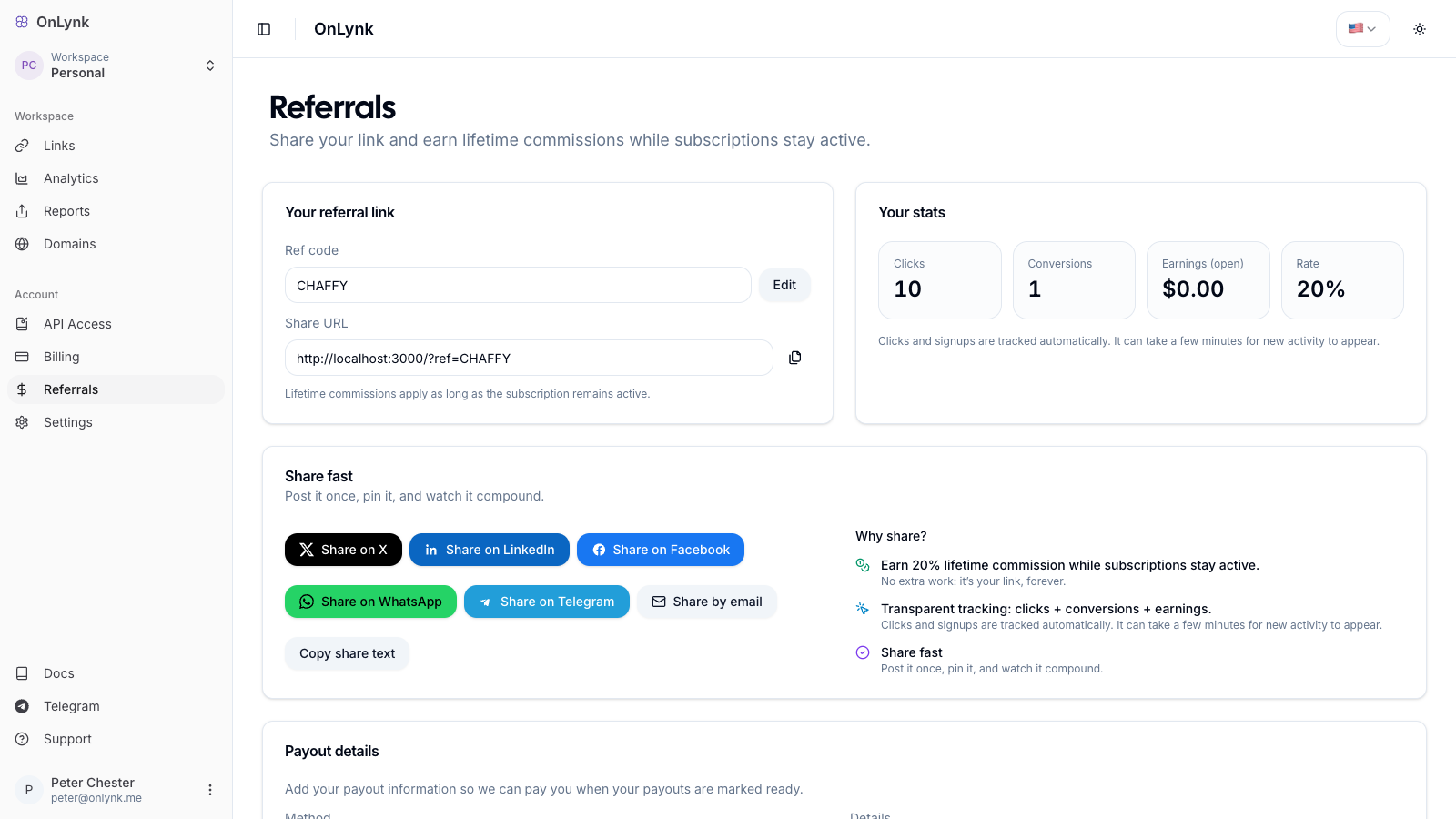
What it is: The referral program lets any OnLynk user earn a recurring commission on the subscriptions of customers they bring in. You get a personal referral link, and OnLynk tracks clicks, sign-ups, and earnings for you.
Referrals dashboard — create your code, copy your link, and track clicks, conversions, and earnings.
## How it works
1. **Create your referral code** in the dashboard. You pick a code (e.g. `MYCODE`) or let OnLynk generate one for you.
2. **Share your link** — `https://onlynk.me/?ref=YOURCODE` — on social, by email, or anywhere your audience is.
3. **A visitor clicks** your link. The referral is captured in their browser for **90 days**.
4. **They subscribe** to a paid plan. OnLynk attributes that customer to you (**first-touch**: one customer is credited to one affiliate, for life).
5. **You earn a commission** on every successful subscription payment they make — not just the first one.
Lifetime & recurring: attribution is first-touch and permanent, and a commission line is created on each paid invoice, so you keep earning as long as your referred customer keeps paying.
## Commission rate
| Detail | Value |
|---|---|
| Default rate | **15%** of each subscription payment |
| Duration | **Lifetime** of the referred customer's subscription |
| Recurring | Yes — one commission per successful payment (Stripe or Radom) |
The rate shown in your dashboard is the rate that applies to your account.
## Getting started
Open **Referrals** in the dashboard:
1. Go to **Dashboard → Referrals**.
2. Either **type a custom code** or use **Generate for me**.
- Codes are uppercased automatically. Follow the format hint shown under the field.
3. Click **Claim** to create your affiliate profile.
4. Copy your **share URL** and start sharing.
You can **edit your referral code** later from the same page (subject to availability — codes are unique).
### Quick share
The Referrals page includes one-click share buttons for **X**, **LinkedIn**, **Facebook**, **WhatsApp**, **Telegram**, and **email**, plus a **copy share text** button with a ready-made message.
## Tracking your performance
Once your profile exists, the dashboard shows:
| Metric | Meaning |
|---|---|
| **Clicks** | Visits recorded on your referral link |
| **Conversions** | Referred users who became customers |
| **Earnings (open)** | Commissions accrued but not yet paid out |
| **Rate** | Your current commission rate |
A **30-day chart** breaks down clicks, conversions, and earnings over time.
About click tracking: clicks are best-effort and may be affected by ad blockers or privacy settings. Conversions and earnings are the source of truth for what you are owed.
## Getting paid
Payouts are processed **manually** by OnLynk. To get paid:
1. In **Referrals → Payout details**, choose a **payout method**: **PayPal** or **Bank transfer**.
2. Enter the matching details (PayPal email, or bank account information).
3. **Save**.
Commissions are grouped into monthly periods and settled according to the program's payout schedule. Earnings shown as **open** are pending; once included in a payout they are marked as paid.
## Frequently asked
**Do I need a paid plan to refer people?**
No — any user can create a referral code and earn commissions.
**What if someone clicks several referral links?**
Attribution is **first-touch**: the customer is credited to the first affiliate captured, and stays attributed to them.
**How long does the referral cookie last?**
**90 days** from the click. If the visitor subscribes within that window, the sale is attributed to you.
## Related
- **[Glossary](https://docs.onlynk.me/glossary/)** — Definitions of *referral code*, *attribution*, and *commission*.
- **[Onboarding](https://docs.onlynk.me/onboarding/)** — Plans and billing context.